Collaboration Center
- 3.8
- Rating
- 10.00K
- Installs
- Free
- Price

 Analysis by App-foxy
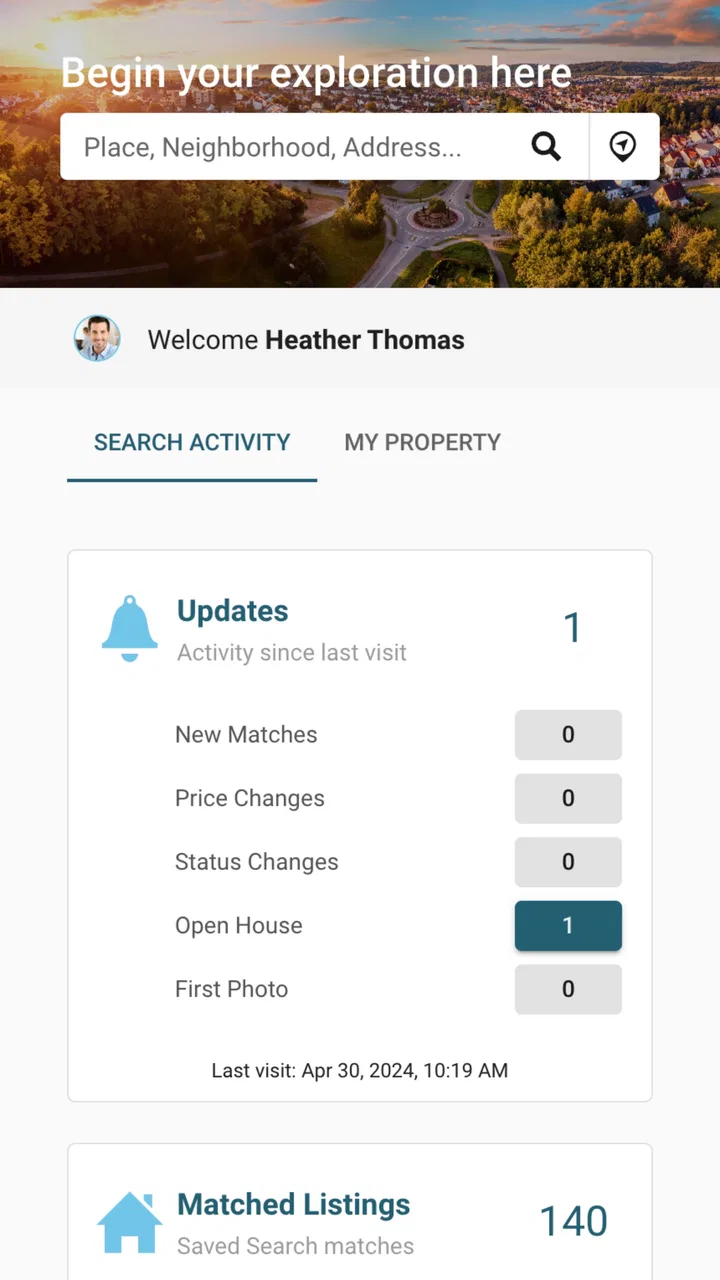
Finding a home is rarely a solo task. One person may be checking listings, another may be comparing neighborhoods, and someone else may need to give the final opinion before a viewing is arranged. Collaboration Center is a free home-and-property app from IntercontinentalExchange, Inc that is built around that shared part of the search. I approached it less like a general property browser and more like a workspace for keeping a home search moving between people.
That distinction matters. The store summary presents it as a way to find a suitable home, while its short description points to a collaboration center. In daily use, I found the second idea more useful than the first: the app makes the most sense when a search involves a partner, family member, client, or another person whose input affects the decision. Its real value is reducing the gap between discovering a property and getting everyone aligned on what to do next.
The app sits in the House & Home category, carries an Everyone age rating, and is available without a purchase price. It has a 3.8 average from around seventeen ratings and has passed ten thousand installs, so I see it as a relatively small, focused tool rather than a dominant marketplace used by everyone. That smaller footprint is worth keeping in mind when deciding whether it should become the main app for a serious property search.
You May Also Like

 AccuWeather: Weather Radar
AccuWeather Review: A Quick, Clear Forecast for Everyday Decisions
For everyday plans, the best forecast is the one you can understand quickly. AccuWeather makes rain timing, radar, and local conditions easy to act on, with a few trade-offs.

 Hill Climb Racing
Why Hill Climb Racing Still Turns Crashes Into One More Run
A tiny car, a bumpy hill and one more upgrade: Hill Climb Racing keeps resurfacing because its simple chaos makes every near-miss feel personal.

 AliExpress - Shopping App
AliExpress Makes Global Shopping Feel Personal, but Shoppers Bear the Risk
AliExpress turns a global marketplace into a pocket-sized discovery engine. Its reach is useful, its shopping loop compelling, and its trade-offs easy to miss.

 Lords Mobile: Kingdom Wars
Lords Mobile Is a Kingdom-Building Routine, Not a Quick Match
A case-by-case verdict on the building, battles, device demands, and social commitments that make Lords Mobile rewarding for some players and exhausting for others.

 PDF Scanner app - TapScanner
TapScanner Makes Paperwork Easier to Capture, Check, and Share
TapScanner makes scanning with a phone feel less like a rescue operation and more like a dependable step in getting work done. Its capture tools are useful, though not flawless.

 Block Blast!
 Shows How Much a Puzzle Game Can Leave Out
A quiet grid game shows why puzzle players increasingly value instant clarity, repeatable skill and low-pressure play—and where the genre still needs to catch up.
More From Our News Desk
View All News


From a loose home search to a shared working process
I start this section with the point where a home search stops being casual browsing and starts involving other people. I’ll look at how a shared process can give each candidate a reason to stay on the shortlist, then turn those opinions into a practical next step rather than another round of scattered messages.
Starting with the actual problem
My starting condition was familiar: several possible homes, too many messages, and no dependable place to collect decisions. A listing might be sent in a chat, a second option saved elsewhere, and an important comment buried under unrelated conversation. Collaboration Center is most relevant at this point, before the search becomes organized but after more than one person has become involved.
I would not begin with it if I were only browsing casually or simply checking what homes exist in an area. A standard property marketplace is usually better for broad discovery because its primary purpose is to expose a large inventory and help people filter it. Collaboration Center becomes more interesting after a shortlist starts to form and the question changes from “What is available?” to “Which of these should we seriously consider together?”
That makes the app especially suitable for couples moving in together, families helping someone relocate, and property professionals who need a clearer way to coordinate with a client. It can also suit a buyer who wants a second opinion without forwarding the same information repeatedly. The important trade-off is that its usefulness depends on participation. If nobody else responds or contributes, the collaborative layer cannot do much more than support one person’s private process.
Building a shortlist without losing the reason behind it
When I review a home, I do not only want to remember its address or appearance. I want to remember why it entered the shortlist: perhaps the commute looked manageable, the layout suited a family member, or the location solved a specific daily problem. A shared workspace is valuable when it keeps those reasons close to the property rather than leaving them scattered across separate conversations.
My practical advice is to agree on a small set of decision questions before inviting other people into the process. For example, I would separate “worth viewing,” “needs more checking,” and “not suitable.” Then I would attach a short reason to each choice. This prevents a common mistake in shared searches: treating every saved home as equally promising and creating a long list that nobody has time to revisit.
A useful, less obvious workflow is to use the app as a discussion filter rather than a final decision-maker. I would first gather options, then ask collaborators to react only to the strongest candidates. That keeps the handoff manageable and makes disagreements easier to understand. If one person rejects a home because of location while another likes its interior, the difference becomes a prompt for a more precise conversation instead of another round of vague messages.
Moving step by step from discovery to action
The first stage is collecting the homes that deserve attention. The second is narrowing them using the priorities that actually affect daily life. The third is deciding whether a candidate deserves a viewing or more research. I found that this sequence is more effective than asking everyone to comment on every possibility at once.
For a realistic example, imagine that I am helping a relative move closer to work. I might begin by gathering several homes that appear relevant, then share the shortlist with the relative and another family member. Instead of sending a stream of individual messages, I would ask each person to focus on a different question: does the location work, does the home fit the routine, and is there any obvious reason to remove it? The app’s collaborative purpose fits this division of attention better than a private notes app.
The strongest habit here is to record decisions while they are fresh. If a property is removed, I would note the practical reason rather than simply abandoning it. If it stays, I would identify the next action, such as checking details or discussing a viewing. This creates a useful trail for the next handoff and avoids reopening the same debate a few days later.
There is also a subtle advantage to separating preference from fact. A collaborator may say that a home “feels too small,” while another may identify a concrete layout issue. Keeping those ideas distinct helps the group avoid presenting personal taste as a confirmed property detail. Collaboration Center works best as a place for coordinated judgement, not as a substitute for verifying the home itself.
Making handoffs clearer between people
Handoffs are where many home searches become inefficient. A buyer may pass a shortlist to a partner, a parent may forward it to a child, or an agent may need a client to respond before continuing. Each handoff can lose context. The recipient may see a property but not know whether it is a favorite, a backup, or something included only for comparison.
I would make every handoff carry three pieces of context: why the property is being shared, what kind of response is needed, and when the group should review the decision. Even when the app makes collaboration easier, people still need a clear request. “What do you think?” produces weak feedback. “Please choose the two homes you would actually view and explain one concern about each” creates a usable next step.
This is one of the app’s best potential strengths for households with different schedules. A person who cannot join a long conversation can review the current shortlist and respond when available. That is more practical than expecting everyone to be online at the same time. It also gives a quieter participant a chance to contribute without having to compete with a fast-moving group chat.
For professional use, I would be more cautious. A property professional may appreciate a shared review process, but the app should not be treated as a complete client-management system. It is better suited to coordinating a specific home search than replacing the broader records, communication routines, and verification steps that a professional workflow may require.
Turning discussion into a result
A successful outcome is not necessarily choosing a home inside the app. The more realistic result is reaching a clean next decision: arrange a viewing, continue checking a candidate, remove it, or pause the search. That is the point at which a collaborative tool proves whether it has helped. If everyone has expressed an opinion but nobody knows what happens next, the process is still stuck.
I recommend ending each review round with one explicit outcome per candidate. A home can be marked as a viewing option, a research item, or a rejected option. I would also keep the shortlist deliberately small after each round. A shorter list makes it easier to compare trade-offs such as location against space, or convenience against suitability for the household.
The result is most useful when the group can explain not only which home it prefers, but why. That explanation helps when circumstances change. If a preferred home becomes impractical, the group can return to the next option without starting from the beginning. This is where a collaboration-focused app can offer more value than a simple favorites list: it supports the reasoning around the choice, not just the choice itself.
Still, I would not confuse an organized result with a verified property decision. A shared shortlist does not remove the need to inspect the home, confirm important details, assess the area, or handle the formal parts of renting or buying. The app can help people arrive at the next step together; it cannot make that step safe by itself.
Where the workflow starts to break
The first point of friction is scale. If I am exploring a large market with many possible homes, a specialized listing service will generally be faster for discovery, filtering, and comparison. Collaboration Center is more convincing after the search has been narrowed. Using it as the only tool from the beginning may feel inefficient because collaboration is not the same as inventory coverage.
The second issue is group discipline. A shared space can become cluttered if participants add options without explaining them, repeat the same comments, or leave old candidates mixed with active ones. The app cannot solve unclear priorities. I would establish a simple rule that every new candidate needs a reason and every rejected one needs a short explanation. That small habit makes the workspace much easier to trust.
The third limitation is the risk of treating opinions as evidence. A group may agree that a home looks ideal and still overlook a major practical concern. I would use the app to identify questions for the next stage, not to close those questions prematurely. This is particularly important when the decision involves a commute, accessibility, school arrangements, or a tight budget, because shared enthusiasm can hide missing checks.
There is also a social trade-off. Collaboration can expose differences that a private search would avoid. One person may prioritize price, another may care about space, and a third may focus on location. That is not a flaw in the app, but it means the tool may reveal a decision problem rather than solve it. In my view, that is still useful, provided the group is willing to discuss the conflict directly.
Who should use it, and who should choose something else
I would recommend Collaboration Center to people who already have a shared home-search situation and need a more structured way to exchange choices. It is a good fit when the same properties need to be reviewed by several people and when the goal is to move from scattered suggestions toward a common shortlist.
I would be less likely to recommend it to someone who is browsing alone, wants the broadest possible property search, or needs a full transaction workflow. A conventional property marketplace is the better first stop for discovering inventory. A notes app may be enough for a solo search. A messaging service may remain more convenient for a quick decision involving only two people. The benefit here appears when the search has enough moving parts to justify a dedicated collaborative space.
Families should also consider whether every participant will actually use it. If one decision-maker refuses to join another app, the shared workflow may become fragmented again. In that case, the best approach may be to use Collaboration Center for the active shortlist while keeping a simple summary available elsewhere for the person who is not participating directly.
The app is free, which lowers the barrier to trying it with a real search rather than committing money before understanding its fit. It supports Android devices from version 7.0 onward, making it accessible on a broad range of older compatible phones. The current version is 1.8.0, and the product is still young enough that I would judge it by whether it fits my workflow rather than assuming it has the maturity of a long-established property platform.
My final take after following the complete workflow
Collaboration Center makes the most sense as the middle layer of a home search. A marketplace can help me find possibilities, and personal research can help me verify them, but this app focuses on the point between those stages where people need to compare, respond, and agree. That is a narrower purpose, but it is also the reason to use it.
I like the idea of moving a search through clear stages: collect candidates, ask for focused reactions, record why options remain or disappear, and finish with a concrete next action. The most valuable insight is that the app should not be judged by how many homes it helps someone save. It should be judged by whether it helps a group stop circling the same choices and make a better-informed next move.
My recommendation is therefore conditional but positive. Try it when your home search involves several people and ordinary chats are becoming difficult to follow. Keep a conventional listing service alongside it for discovery, and keep your own verification process for anything important. Skip it if you only need a quick solo browse or a complete end-to-end property service.
For a free House & Home app with an Everyone rating, Collaboration Center is most useful when the problem is coordination, not simply finding listings. Its developer, IntercontinentalExchange, Inc, has positioned it around that shared decision process, and that is the lens I would use before installing it. If your next home decision depends on several people responding clearly, it is worth testing; if not, its collaborative focus may feel like an extra step rather than a solution.
FAQs for Collaboration Center
01What is Collaboration Center and what are its main features?
Collaboration Center is a comprehensive app designed to enhance team communication and project management. Its main features include real-time messaging, video conferencing, task assignment, file sharing, and integration with other productivity tools like calendars and email. The app aims to streamline workflow and improve collaboration among team members, whether they’re in the office or working remotely.
02Is Collaboration Center available on both Android and iOS platforms?
Yes, Collaboration Center is available for download on both Android and iOS devices. The app is designed to provide a seamless experience across different platforms, ensuring that users have access to all features whether they are using a smartphone, tablet, or desktop interface. This cross-platform compatibility makes it a versatile choice for teams.
03Does Collaboration Center offer any free version or trial period?
Collaboration Center typically offers a free version with basic features to help users get started. Additionally, there is often a trial period for premium features, allowing users to explore more advanced functionalities like extended storage, enhanced security, and integration capabilities before committing to a subscription plan. Check the app store for current offerings.
04How secure is the data shared within Collaboration Center?
Collaboration Center prioritizes user security by implementing strong encryption protocols for data in transit and at rest. The app also offers features such as two-factor authentication, access controls, and regular security updates. These measures ensure that sensitive information shared within the app remains protected against unauthorized access.
05Can Collaboration Center integrate with other productivity tools?
Yes, Collaboration Center is designed to integrate seamlessly with a variety of productivity tools. Users can connect with popular applications such as Google Workspace, Microsoft Office 365, Trello, and Slack. These integrations enable users to streamline their workflow, manage tasks efficiently, and maintain a centralized hub for all their collaboration needs.
Pros
- Intuitive user interface enhances productivity.
- Real-time collaboration across devices.
- Seamless integration with other apps.
- Customizable notifications for better focus.
- Secure data encryption for privacy.
Cons
- Limited offline functionality.
- Occasional sync delays reported.
- Needs more advanced customization.
- Free version has restricted features.
- Consumes significant battery power.

Collaboration Center
Gallery